


1
/
of
12
No reviews
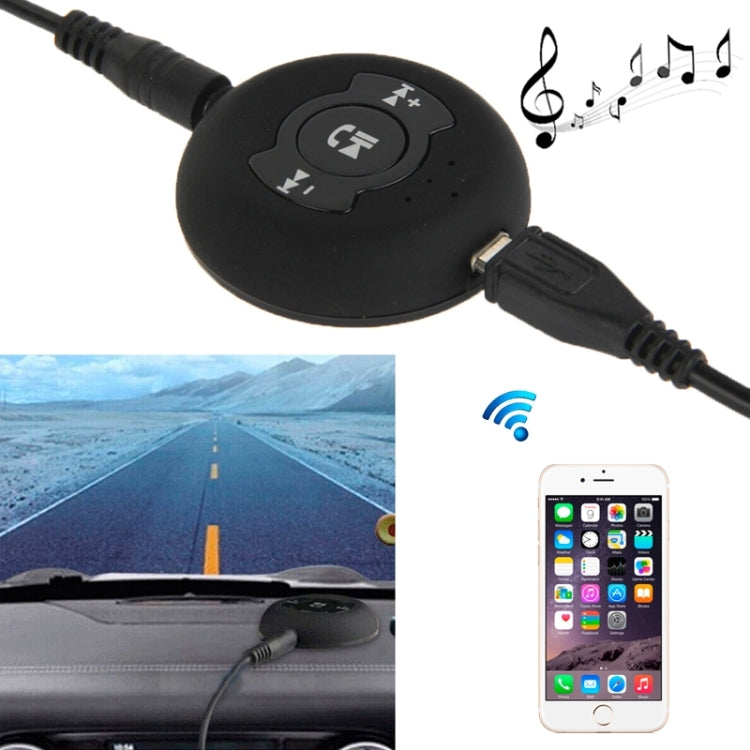
H366 Bluetooth 4.0 Music Audio Receiver Adapter with Hands Free Function For iPhone, Samsung, HTC, Sony, Google, Huawei, Xiaomi and other Smartphones
H366 Bluetooth 4.0 Music Audio Receiver Adapter with Hands Free Function For iPhone, Samsung, HTC, Sony, Google, Huawei, Xiaomi and other Smartphones
SKU: S-PC-2430
Regular price
$28.00
Regular price
Sale price
$28.00
Duties & Import Tax Information
Duties are only included if shown at checkout. Otherwise, your local government may apply customs fees, which your courier will collect directly from you before delivery.
In Stock
CHN
This item is shipped from China.
Processed in 0–3 days
Quantity
Couldn't load pickup availability
Shipping info
To find all available shipping methods and exact delivery times, add the product to your cart and check using our shipping calculator.
30-day returns
Fast refunds: Once we receive and check your item, we aim to process your refund within 48 hours.
Return postage: Just changed your mind? You'll need to cover the return postage. If the item arrived faulty, we'll cover the cost to get it back to us.
Your details are safe
We treat your data the way we'd want ours treated. Your payment details are locked down with bank-level encryption. We never actually see your credit card numbers, and we will absolutely never sell your personal information.
Product Details
Features
1. Delicately disc design, exquisite workmanship and mini size with lighter weight.
2. Multi-function technique, one Bluetooth receiver can connect with two Bluetooth devices.
3. High quality stereo transmission for a better music experience.
4. Reverse control of the music play of connected Bluetooth devices.
5. Safe driving design, it can be used as a Bluetooth car kit which with music play function.
Music Function Operation Steps
1. Step one: Connected the H-366 with speaker by 3.5mm audio cable, long press the on-off key to start up;
2. Step two: Open Bluetooth devices e.g. smart phone, tab pc and PC, search H-366;
3. Step three: After pairing successfully, play the music wirelessly.
Multi-point Connection Steps
1. Long press power key 5 seconds, cell phone 1 connected with the device successfully.
2. Long press power key 2 seconds, "beep".
3. Open Bluetooth function of cellphone 2, connect it with the device.
4. Connect the device with cellphone 1 again by manual operations.
5. The device connected with these two cell phones successfully.
Remark: After Multi-point setup successfully, automatically connect with two cellphones when use again.
Remark: If cellphone changed, enter pairing mode to connect again. default to connect the last two cell phones
Remark: After long term use, restore factory settings when connected failure(disconnect the cellphone Bluetooth connection after restoring factory settings)
Press Key Function
1. Volume +: Short press, last song; Long press, Volume plus
2. Volume -: Short press, next song; Long press, Volume decline
3. Power key: Short press, Play/Pause; Double press, redial; Long press, turn on/off
4. Restore factory settings: Long press power key and volume plus key five seconds to restore factory settings(Red and blue light blink twice and with prompt tone)
1. Delicately disc design, exquisite workmanship and mini size with lighter weight.
2. Multi-function technique, one Bluetooth receiver can connect with two Bluetooth devices.
3. High quality stereo transmission for a better music experience.
4. Reverse control of the music play of connected Bluetooth devices.
5. Safe driving design, it can be used as a Bluetooth car kit which with music play function.
Music Function Operation Steps
1. Step one: Connected the H-366 with speaker by 3.5mm audio cable, long press the on-off key to start up;
2. Step two: Open Bluetooth devices e.g. smart phone, tab pc and PC, search H-366;
3. Step three: After pairing successfully, play the music wirelessly.
Multi-point Connection Steps
1. Long press power key 5 seconds, cell phone 1 connected with the device successfully.
2. Long press power key 2 seconds, "beep".
3. Open Bluetooth function of cellphone 2, connect it with the device.
4. Connect the device with cellphone 1 again by manual operations.
5. The device connected with these two cell phones successfully.
Remark: After Multi-point setup successfully, automatically connect with two cellphones when use again.
Remark: If cellphone changed, enter pairing mode to connect again. default to connect the last two cell phones
Remark: After long term use, restore factory settings when connected failure(disconnect the cellphone Bluetooth connection after restoring factory settings)
Press Key Function
1. Volume +: Short press, last song; Long press, Volume plus
2. Volume -: Short press, next song; Long press, Volume decline
3. Power key: Short press, Play/Pause; Double press, redial; Long press, turn on/off
4. Restore factory settings: Long press power key and volume plus key five seconds to restore factory settings(Red and blue light blink twice and with prompt tone)
Verified Compatible
Guaranteed fit for device in the title. Wrong part? Full refund including shipping.
Share


$28.00