


News
Galaxy phone overheating: causes, fixes & prevention
Quick answer: If your Samsung Galaxy becomes uncomfortably hot, stop using it and let it cool. Disconnect the charger if connected. Repeated overheating needs investigation, but heat alone does not establish that the battery or charging circuit is faulty.
Why a Galaxy phone can get warm
Games, navigation, data transfers, setup, background activity and charging can increase heat. Sunlight, poor reception and damaged charging accessories can also contribute. Samsung describes these factors in its guide to Galaxy heat causes. Record what the phone was doing when the problem began rather than assuming one cause.
What to do first
- Stop demanding tasks and disconnect charging. Let the phone cool before using or charging it again.
- Move it away from direct sun and heat. If safe and easy, remove its case. Do not use a fridge, freezer or water to cool it.
- After it cools, restart and check for software and app updates.
- Check the cable and charger for visible damage. Do not reuse damaged accessories.
Samsung's overheating guidance explains that protection features can limit performance or charging. Follow the warning on your device rather than relying on a universal temperature threshold.
Reduce repeat heat episodes
Avoid intensive use while charging, keep the phone out of hot cars and direct sunlight, and allow heat to escape rather than covering it. Samsung also suggests checking the case and display refresh-rate settings in its frequently-hot device guide. Menu options differ by model.
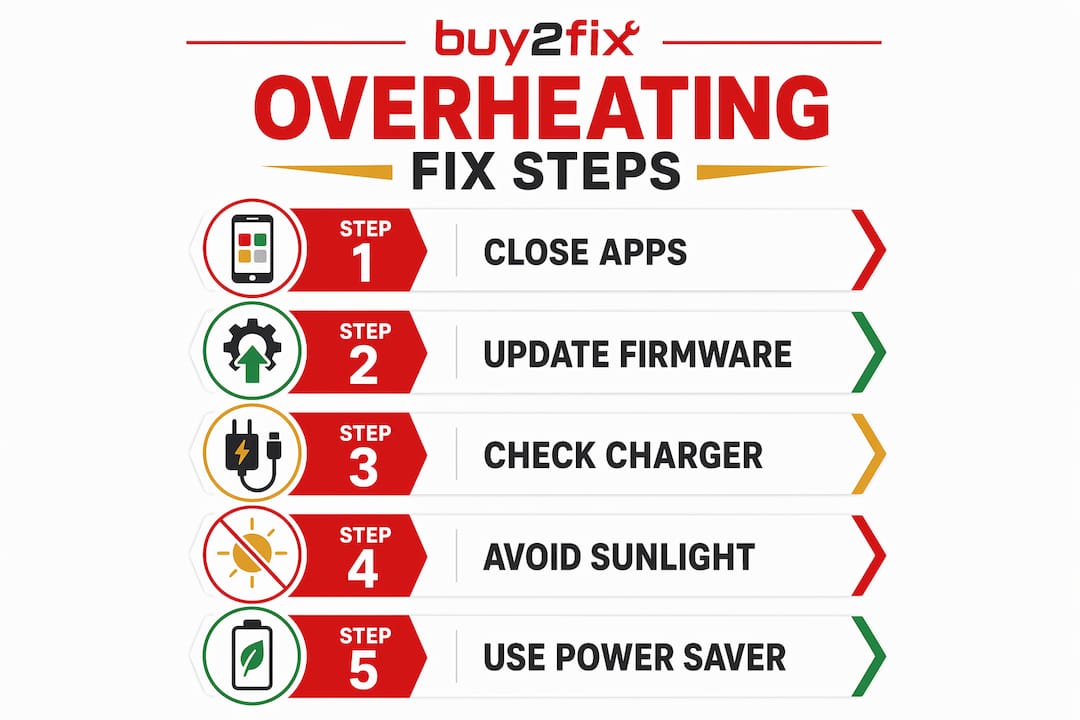
The illustration summarises checks to make after the phone has cooled; cooling comes before updates or further testing.
When to seek help
If heat returns during light use or the phone does not cool after these steps, contact Samsung Support or a qualified repairer. Stop using and charging a device with swelling, a lifting panel or a damaged battery. Do not squeeze, puncture or try to reseat it.
Prepare a useful fault report: exact model, software version, when the heat starts, whether charging is involved, accessories used, warning messages and recent changes. Include photos of visible damage only if they can be taken safely. Do not reproduce overheating deliberately to collect evidence.
Common questions
Does heat mean I need a new battery?
No. Ask for a diagnosis before ordering a battery or charging part. Device age alone is not a diagnosis.
Should I wait two days after an update?
There is no universal waiting period that makes uncomfortable heat safe. Follow the cooling steps and seek help if it persists.
Does a high battery-use percentage identify a bad app?
Not by itself. Compare the app's use with what you were actually doing and note unexpected activity for the support report.
Before buying parts
If a repairer identifies a failed component, match the exact model code and part specification to the listing. Confirm what is included and who will install it. Browse Buy2fix with that information rather than selecting a part from the symptom alone. For a separate screen fault, use our Samsung display troubleshooting checklist.
Editorial review: 3 November 2026. Based on the linked Samsung guidance; this is not a diagnosis of an individual phone.
Let customers speak for us
I recommend it to everyone

This case allowed me to upgrade and modernize my iPhone XR in a very elegant way.

good practical product

Trop bien

love that it came on time and works really well

Very simple and easy to use. Thank you!!

Too small because of disability

Fits and watch works well with it on.

Looks great!

Snel en makkelijk besteld, vlotte levering !

item was packaged safely, no damage. it’s now October and since replacing it in January i’ve had no issues.

Great

They had what I was looking for ... ordering was easy, payment was easy, delivery was as promised.
-

Absolutely love this case! Heavy, sturdy and full coverage
